Krea 3, GAUNTLET Edit.
One photoreal frame, twelve chained edits, and one instruction to put it all back. Krea 3 landed every additive edit first try and kept a sign legible through a woodblock print, then came home with a different woman on a different mountain and could not undo a thing. Scored by pixel drift, on video.
At a glance
Why this matters
Every image model now ships with a chat box. You generate a frame, then you talk to it: make it night, add snow, now make it a painting, now put it back. The pitch is that the model understands your picture the way a retoucher does. The useful question is narrower: does it understand the picture, or only the pixels in front of it?
This run asks that question the only way that gives a clean answer. One photoreal frame from Krea 3, the closed access build, then twelve edits in a row, each one applied to the previous result, each one kept as it came out. No rerolls, no cherry picking, no inpainting masks. The edits go somewhere far (night, snow, spring, a thunderstorm, a woodblock print) and then try to come home: restore photorealism, remove the weather, restore the lighting, restore the robe, and finally “return the scene to exactly how it was at the start.” If the model holds the original anywhere, that last instruction is where it shows.
The short version:
- Additive edits are superb. Twelve prompts, twelve first-try results, every one of them physically plausible. Snow settled on the tops of things and nowhere else. Lightning lit the underside of the storm. Each edit kept the edits before it.
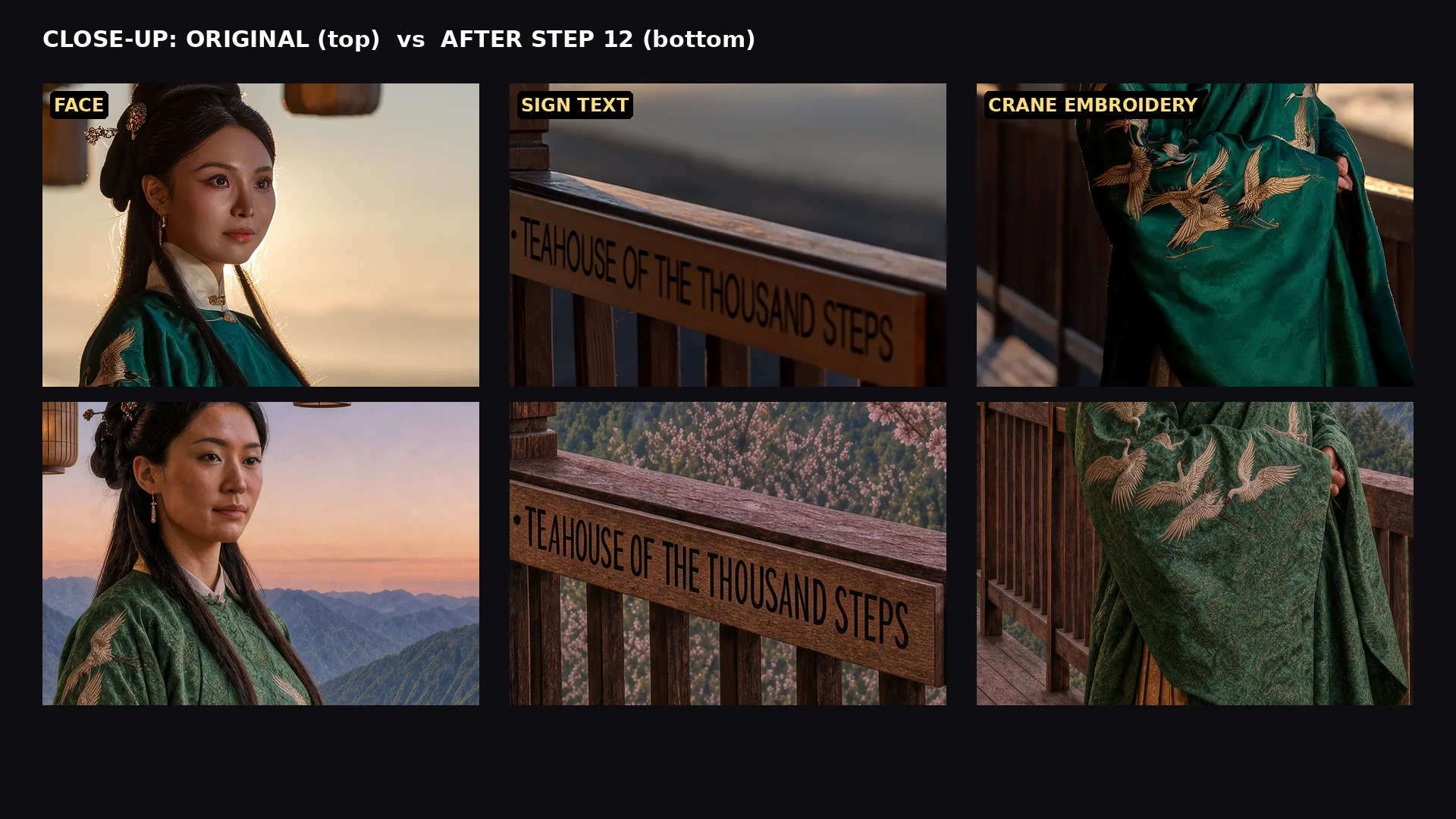
- Text is locked. A wooden sign reading “茶 · Teahouse of the Thousand Steps” survived all twelve edits with correct letters, including the trip through ukiyo-e, where the model re-lettered it in ink.
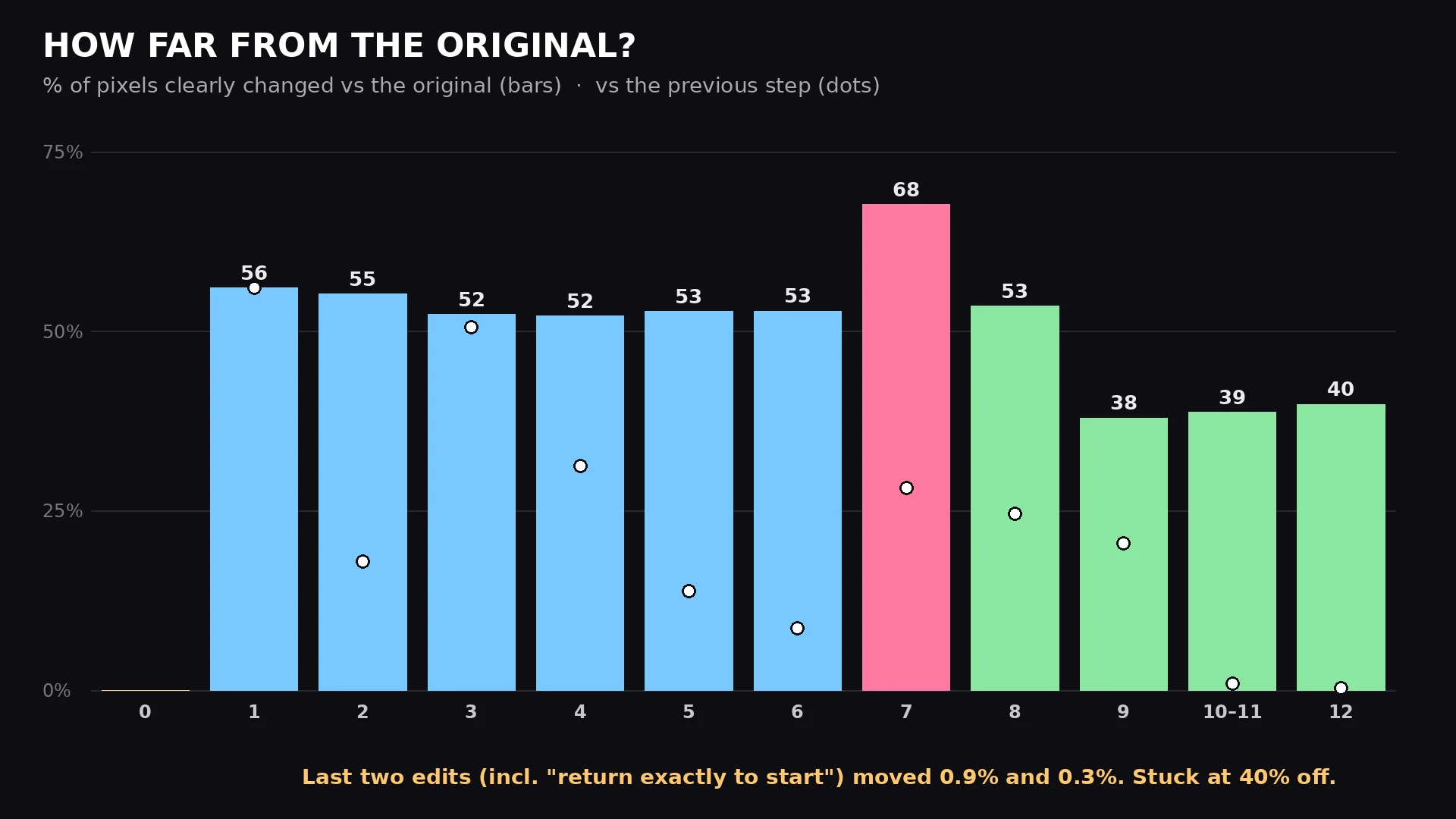
- The model has no memory. Asked to return to the start, it moved 0.3% of the pixels and stayed 40% off. It edits the image in front of it, not the one you started with.
- Style round trips change the person. Photo to woodblock to photo brought back a different woman in a different fabric. The model reads a drawing as a description, not as a compressed photo.
- Scene edits drift silently. “It is spring” turned a sea of clouds into forested mountains. Nothing in the next eight prompts could bring the clouds back.
The rest of the page is the evidence: the whole trip as a 50 second video, every frame, every prompt, the drift numbers, and the close-ups where the quality story lives.
What I measured
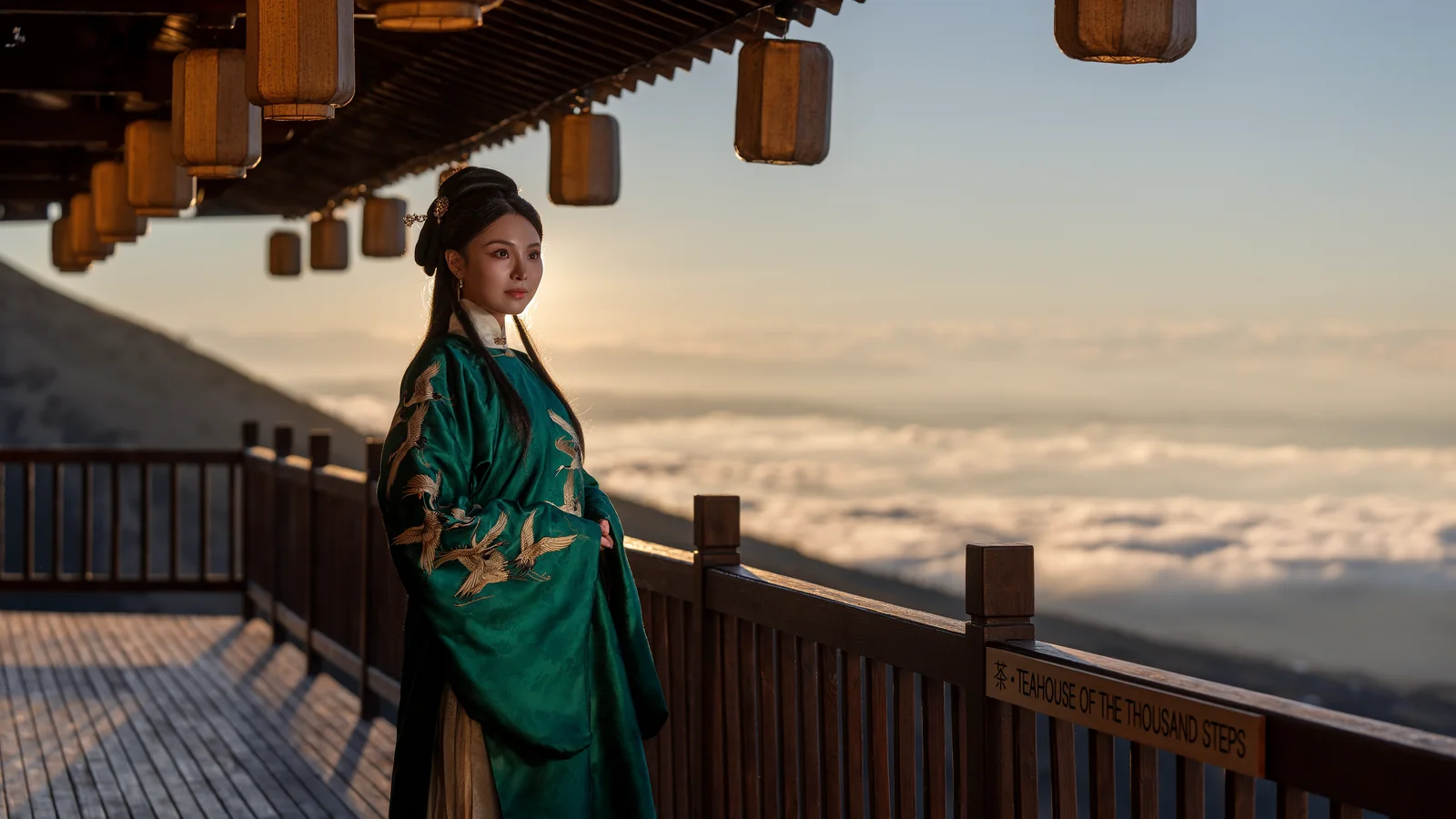
The base image is a Krea 3 generation from a prompt describing a woman in an emerald silk robe with gold crane embroidery, standing at the railing of a mountain teahouse at golden hour, above a sea of clouds. Every edit after that is one sentence typed into the same conversation, and every output is the first thing that came back, saved at full 2736×1536. The whole session took fifteen minutes of wall clock including the typing.
The number on this page is pixel drift: the share of pixels whose luminance moved by more than 40 of 255 between two frames, measured at 684×384 so that fine noise does not count. It is scored two ways for each step, against the previous frame (how much this edit touched) and against the original (how far from home we are). Colour-only changes under-count on this metric, which matters for one row below and is said there. Everything else on the page is judged by eye, at 100% zoom, and the close-ups are here so you can judge too.
Results
| Step | Prompt, verbatim | What happened | Moved | Off |
|---|---|---|---|---|
| 0 | Base image | Golden hour, backlit, sea of clouds, bare hillside on the left | 0% | |
| 1 | Change the time to blue hour: the lanterns are glowing and the first stars are appearing. | Blue hour, lanterns lit, stars. The bare hillside quietly grew a forest. | 56.0% | 56.0% |
| 2 | Make it deep night with a huge full moon rising over the clouds. | Moon, moonlit cloud tops, more stars | 17.9% | 55.2% |
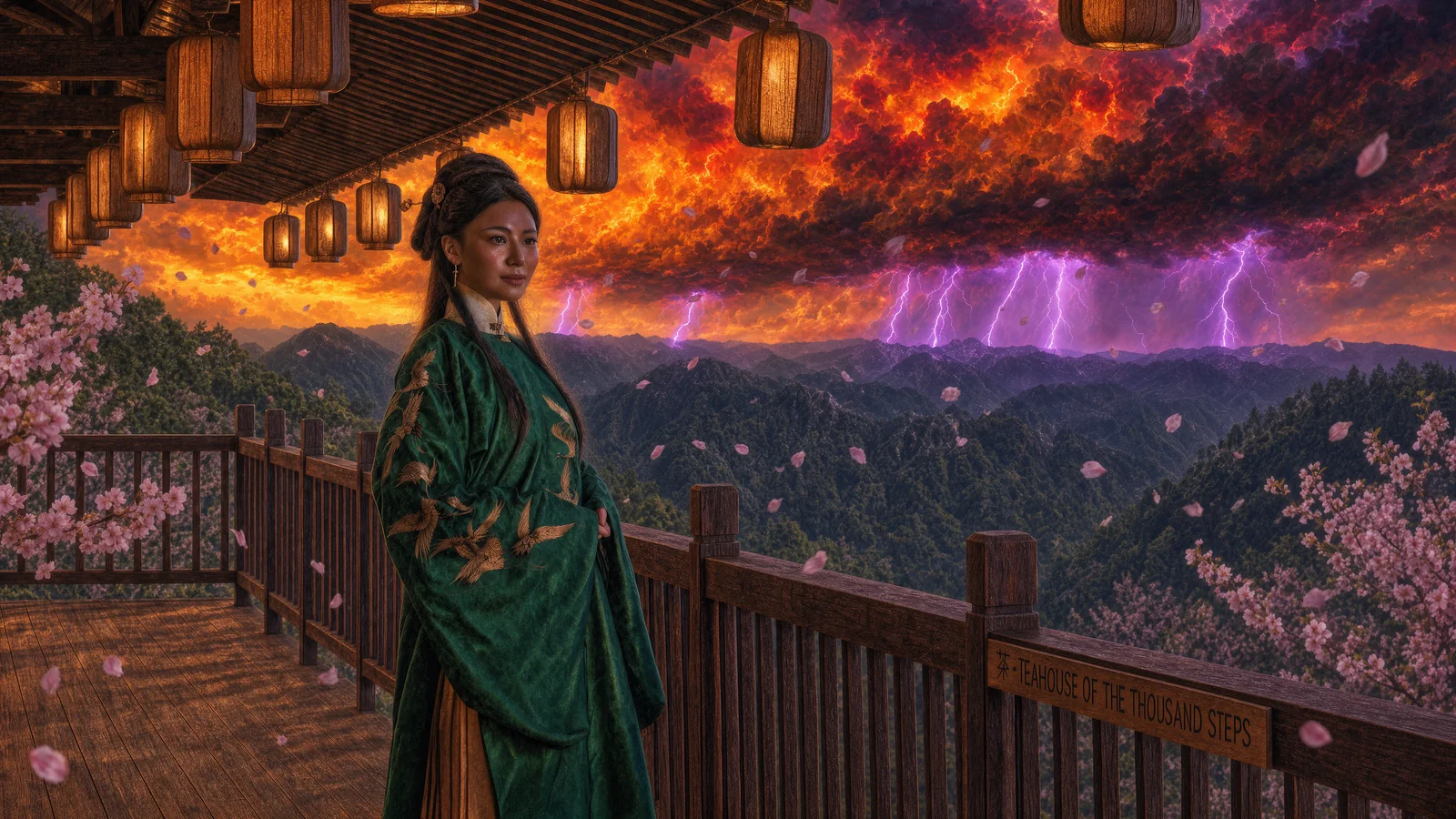
| 3 | Add heavy snowfall, with snow settling on the railing, the eaves and the lanterns. | Snow on every upward face: railing caps, posts, lantern lids, eave edges, her hair | 50.6% | 52.3% |
| 4 | Replace the snow with cherry blossom petals blowing in the wind. It is spring. | Petals in, snow out. The sea of clouds became forested mountains and blossom trees appeared at both edges. | 31.2% | 52.1% |
| 5 | Add a thunderstorm on the far horizon with purple lightning lighting the clouds. | Storm front, seven bolts, petals kept | 13.8% | 52.7% |
| 6 | Make the clouds below glow with fiery sunset colours. | Fire sky, lightning kept | 8.6% | 52.8% |
| 7 | Repaint the entire scene as a traditional ukiyo-e woodblock print. | Full style transfer. Composition, sign, lanterns and pose all kept. | 28.1% | 67.6% |
| 8 | Restore the scene to a photorealistic cinematic film still. | Photoreal again. A different woman, white cranes, brocade robe, paper lanterns, rain. | 24.5% | 53.5% |
| 9 | Remove the cherry blossoms and the storm. Clear evening sky. | Storm gone, airborne petals gone. The blossom trees stayed. The mountains stayed. | 20.5% | 37.9% |
| 10, 11 | Change the lighting back to golden hour. / Restore her emerald silk robe and gold crane embroidery to full original detail. | Sky a shade warmer, cranes tinted gold, green a shade darker | 0.9% | 38.7% |
| 12 | Return the scene to exactly how it was at the start: same lighting, sign, lanterns and pose. | Nothing | 0.3% | 39.8% |
“Moved” is drift from the previous frame, “Off” is drift from the original. Steps 10 and 11 were sent as one turn and produced one image, so they share a row. The two numbers that matter are at the bottom. The two most demanding prompts of the session, restore the original robe and return to the start, were the two smallest edits the model made.
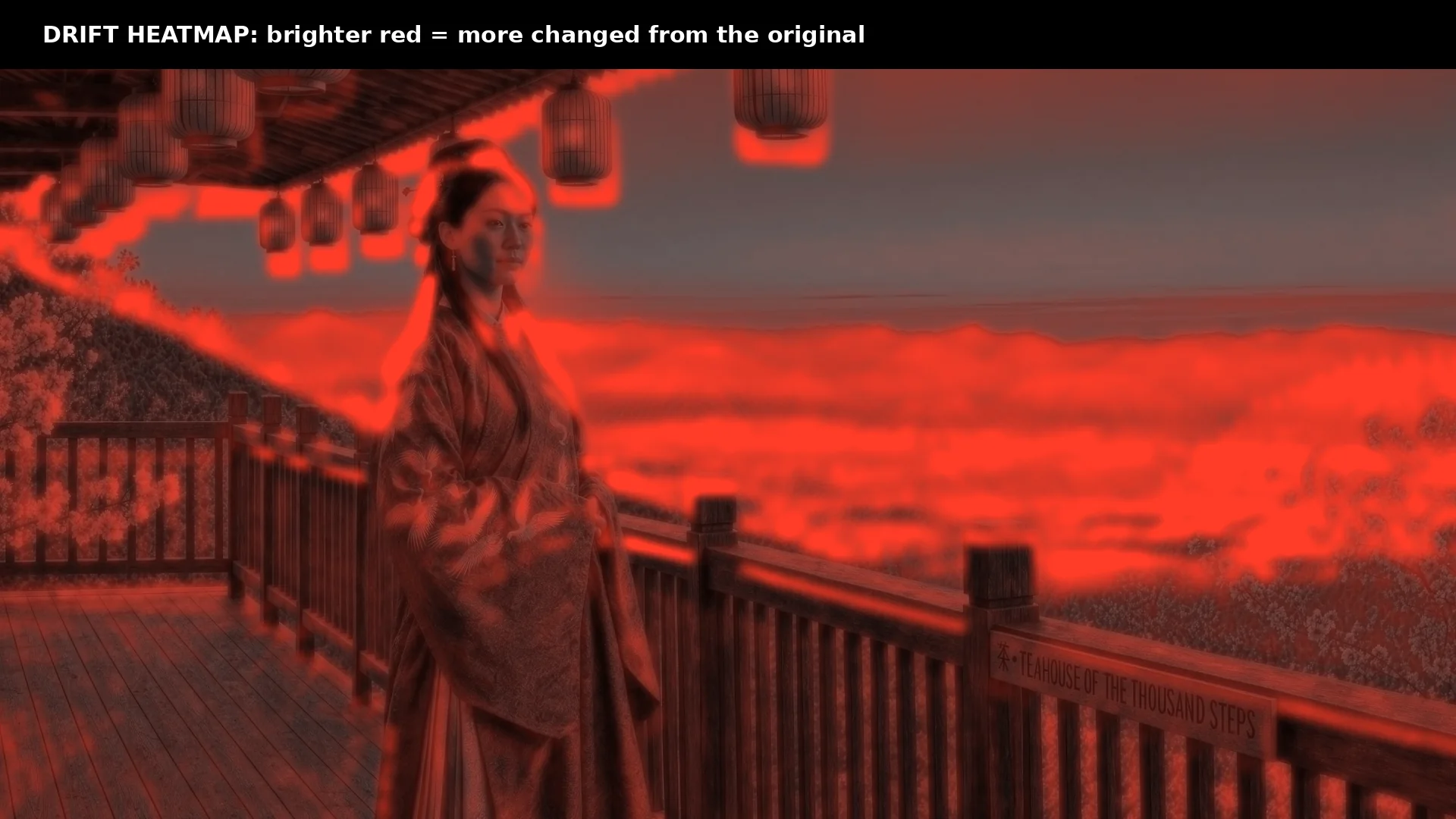
Where the 40% lives is as telling as the number. Cropping the final frame against the original by region:
| Region of the final frame | Changed vs original |
|---|---|
| Her face | 52.5% |
| The robe | 35.5% |
| The sign | 33.2% |
| The sky, right half | 31.2% |
The face moved more than the sky did. Part of that is lighting, since the original is backlit and the return is lit from the front. Most of it is that it is not the same face.
The journey: what excellent looks like
Steps 1 to 6 are the case for this model, and they are a strong case. Each edit is a physical edit, not a filter.
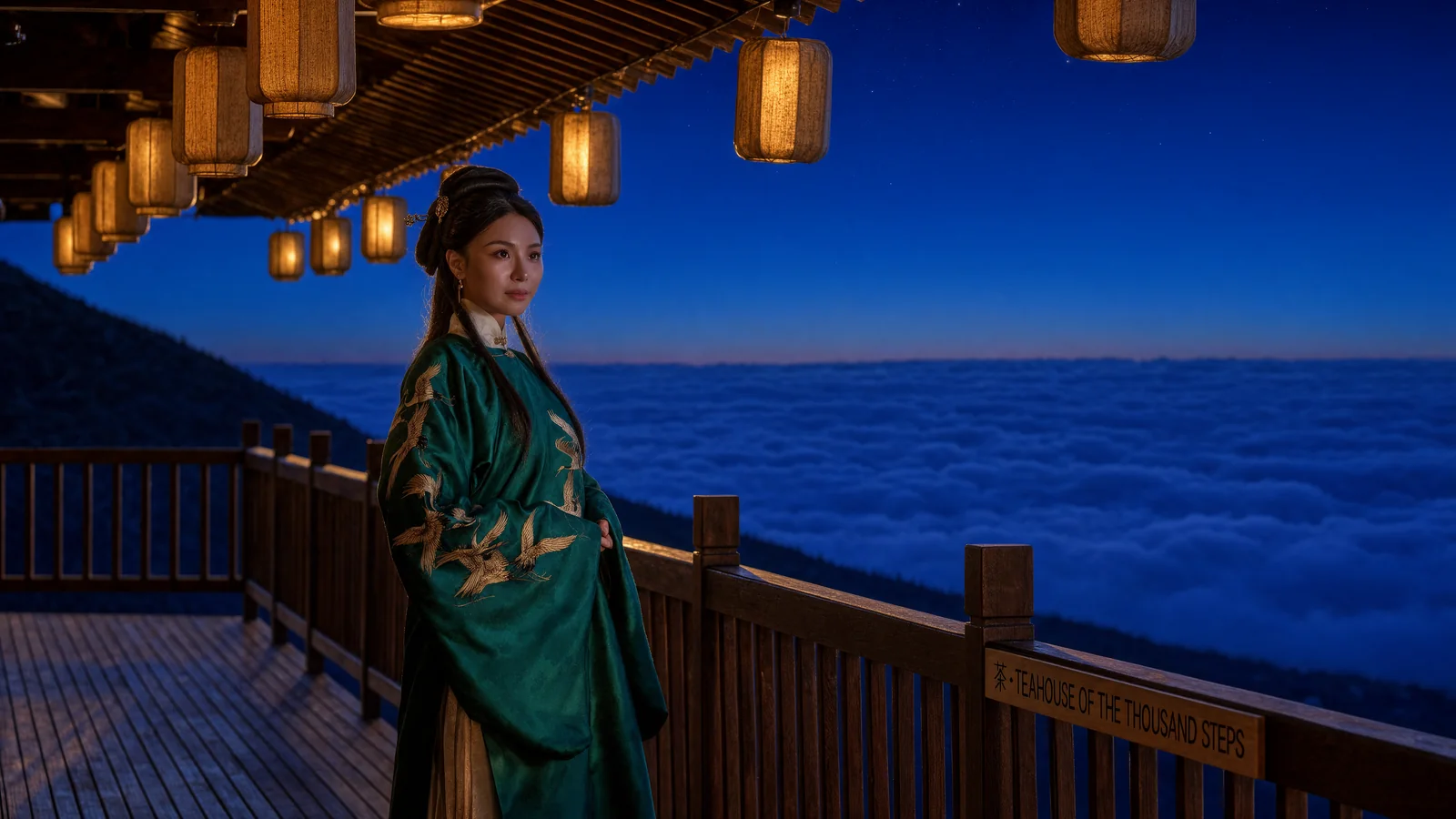
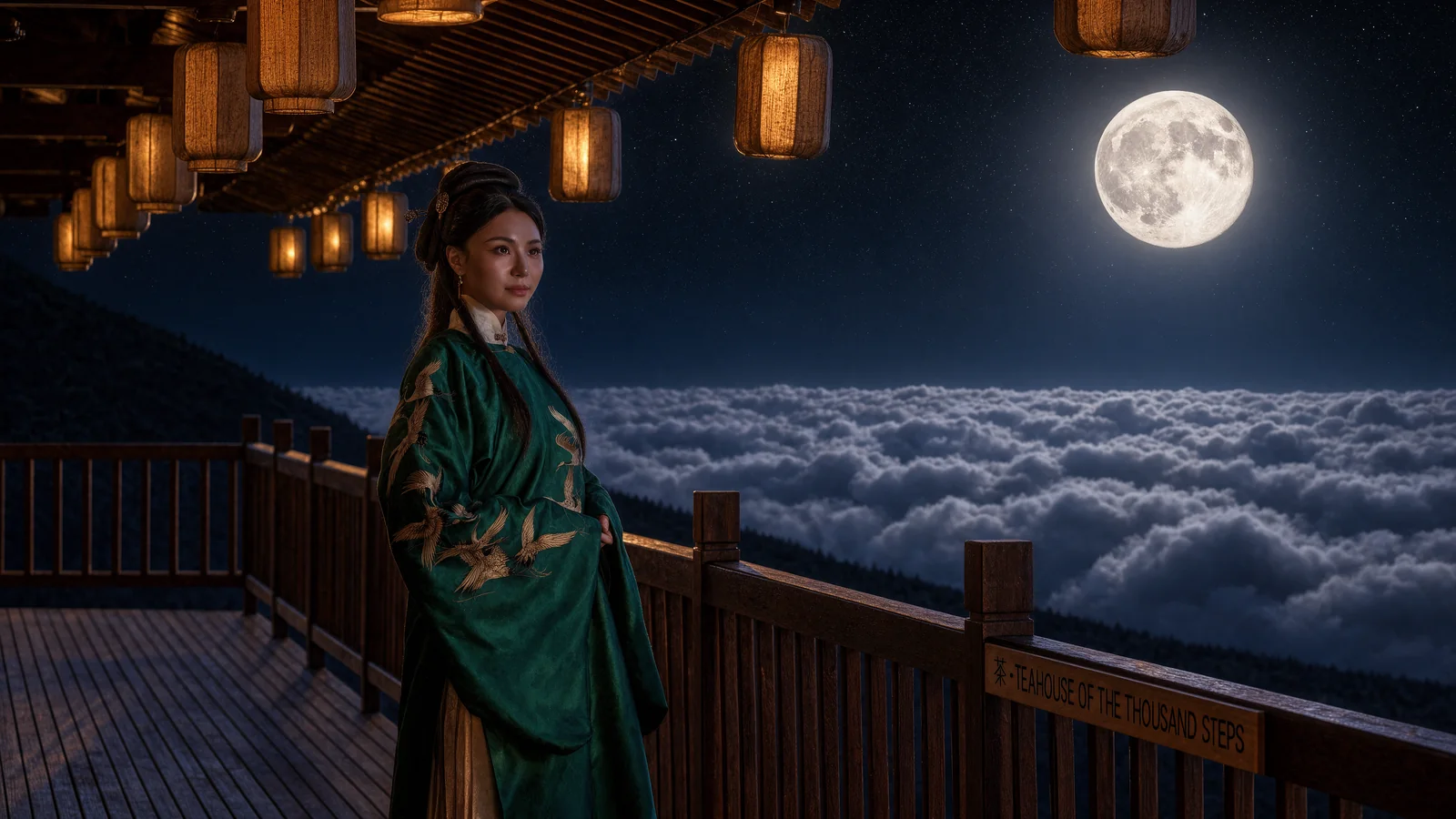
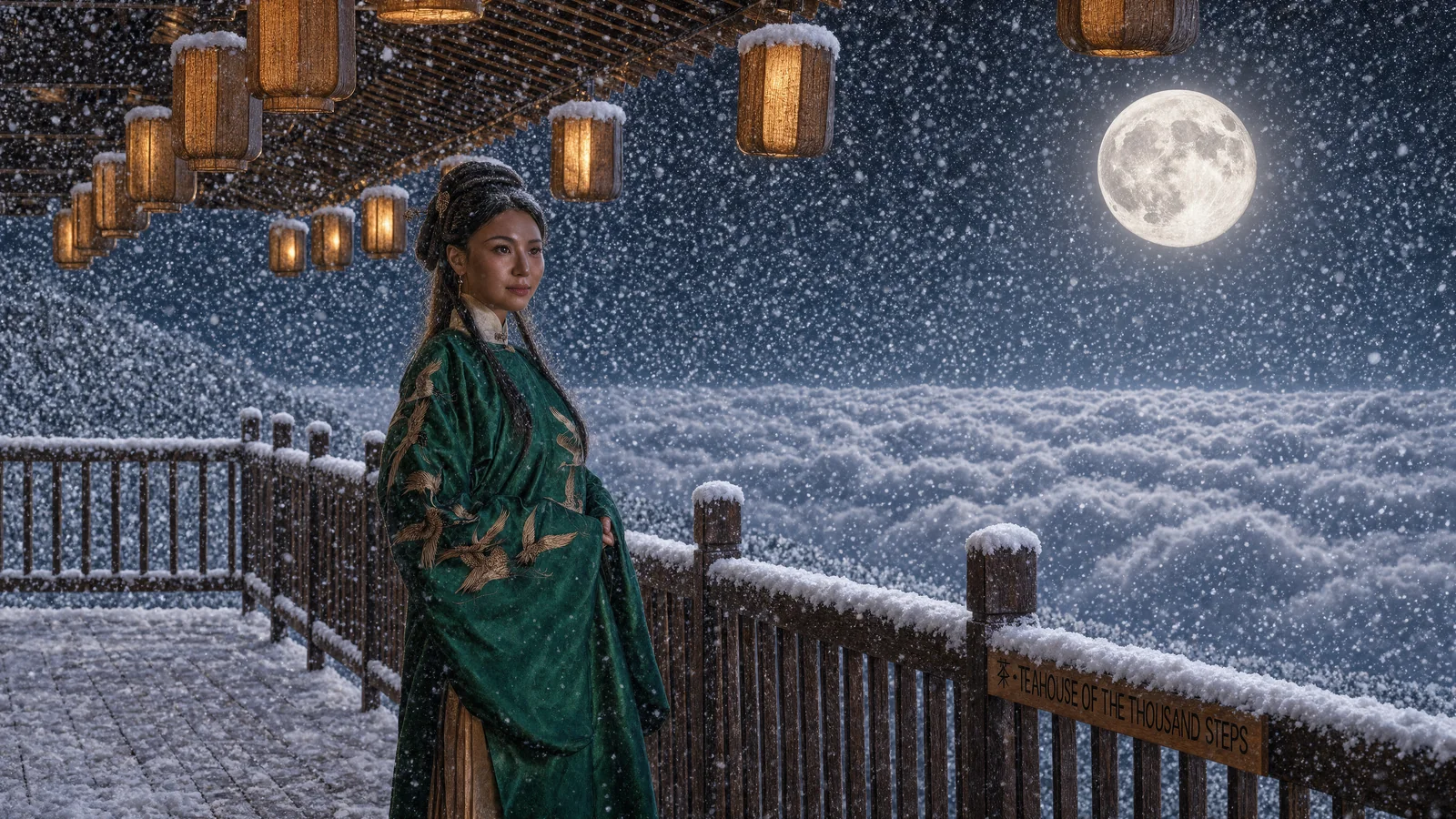
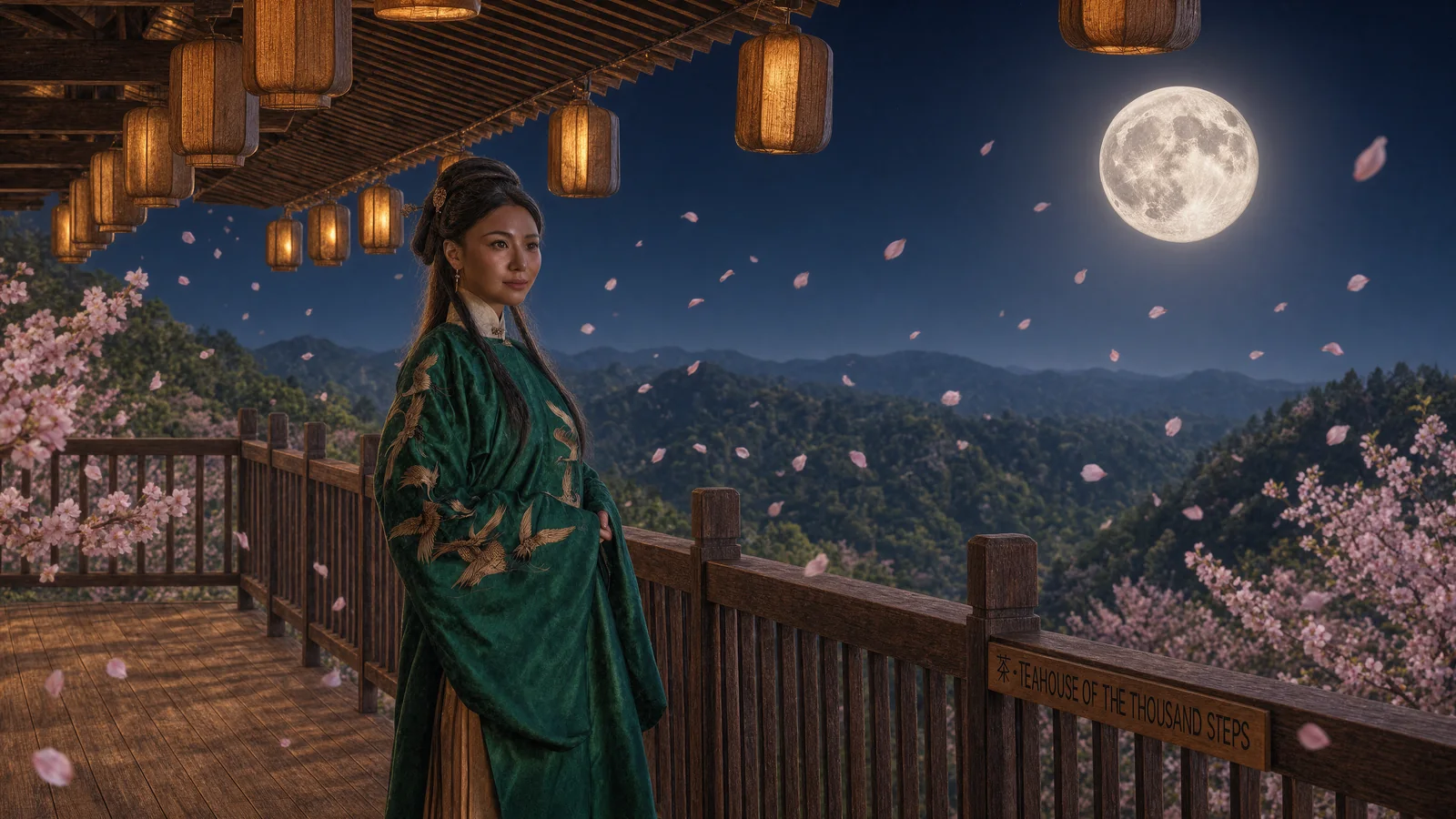
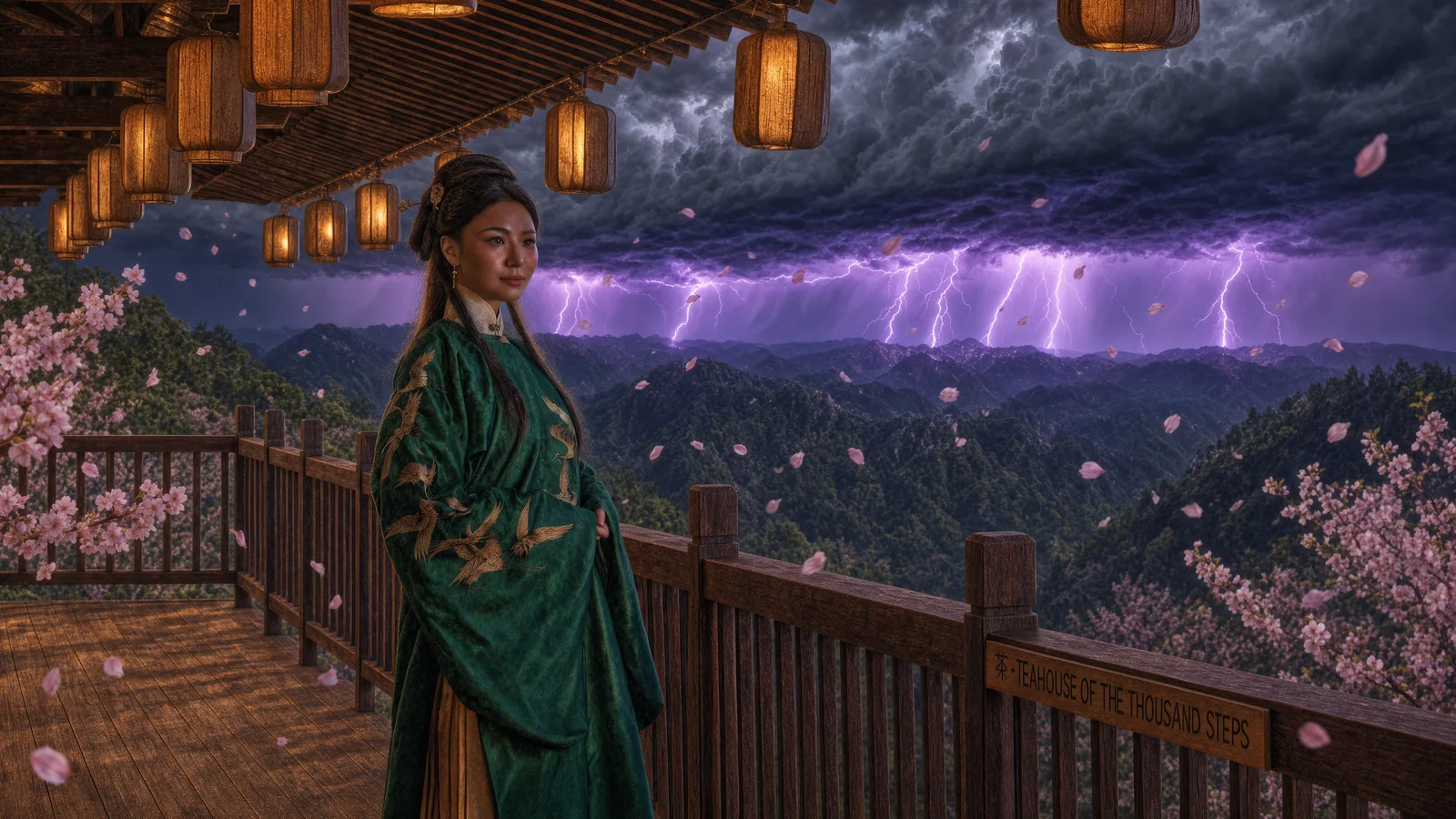
Look at step 3. The prompt named three surfaces, railing, eaves and lanterns, and the model put snow on all three, then kept going: it capped every post, every lantern lid, the top edge of the sign, and her updo, and it put snow nowhere a flake could not land. The deck is dusted, the undersides are dry. In step 2 the moon does not just appear, it lights the cloud tops, and the lantern glow from step 1 is still there at the same warmth. In step 5 the lightning is behind the storm front and lights it from inside. In step 6 the sky goes to fire and the seven bolts from step 5 are still in it. Edits accumulate, which sounds like a low bar until you have used a model that forgets the last instruction while applying the next one.
The silent change is on the left edge. The original has a bare, grassy hillside there. At step 1, with no mention of it, the hill grew trees. At step 4, “it is spring” turned the hill into cherry trees in bloom and turned the sea of clouds beyond the railing into forested mountains. Neither prompt named the hill or the clouds. Both changes are permanent: eight edits later, including “return exactly to the start”, the mountains are still there.

The quality of the base frame sets up everything after it. At 100% the original has skin texture, catchlights, a rim of sun through the hair, and gold thread with the satin stitch visible on a silk that holds a real specular highlight. Krea 3 holds that standard through the first six edits. The face in step 3 is the face in step 0 with snow in its hair.

The style break
Step 7 is the best single image of the session and the step that broke the trip.
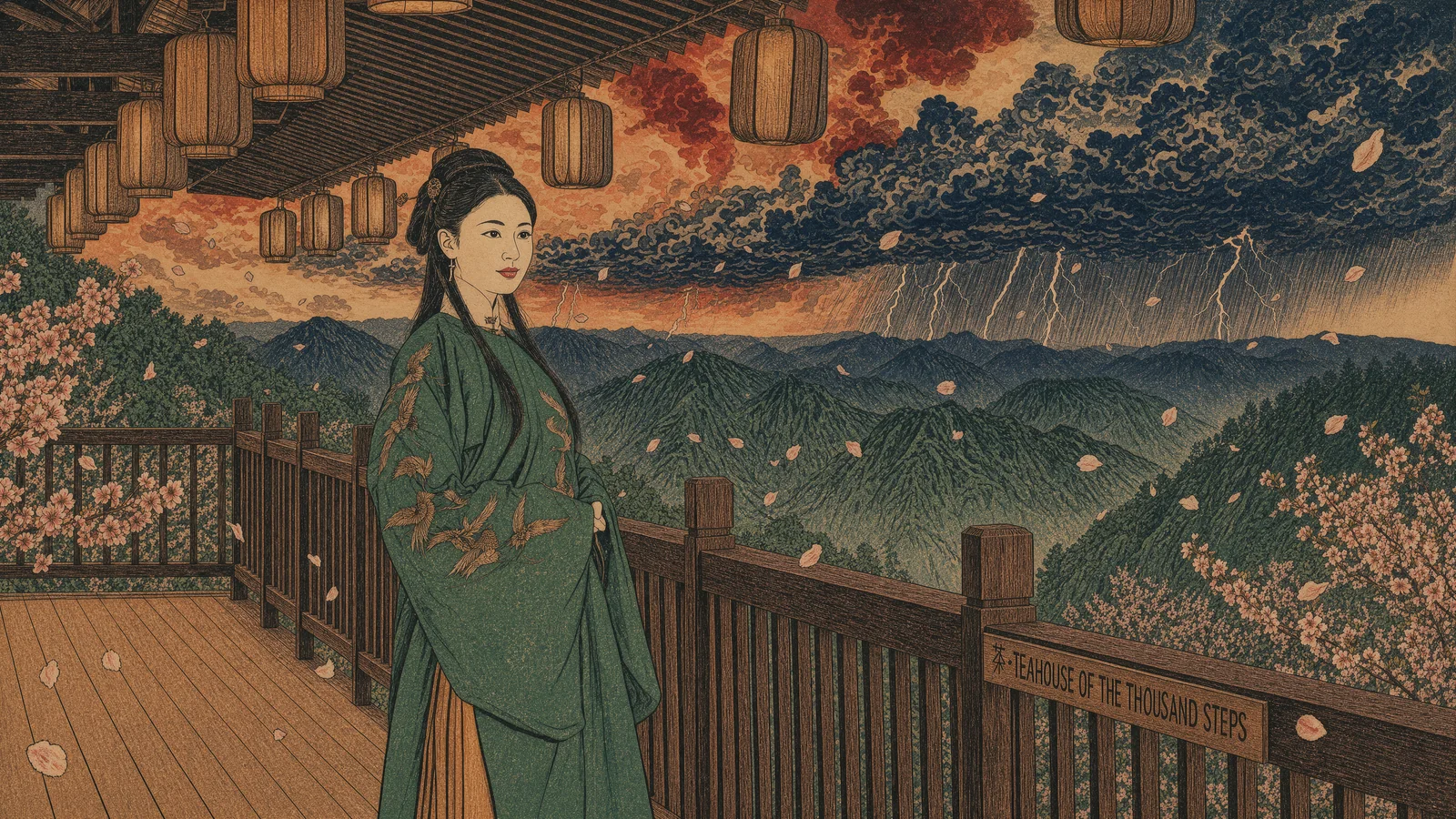
The woodblock is genuinely good. Flat colour fields, ink outlines, visible paper grain, the sky rendered as stacked cloud forms in the right idiom, the mountains hatched. And the model kept everything structural: the camera, the pose, the eleven lanterns in their eleven positions, the petals, and the sign, which it re-lettered by hand in ink and got right. It is the one edit of twelve that touched every pixel, and it is the one edit where touching every pixel was the request.
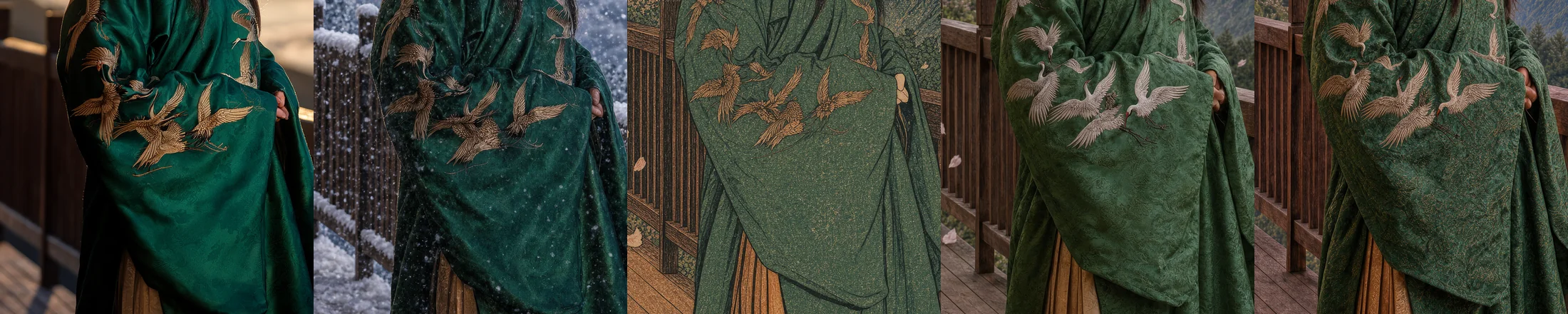
Step 8, “restore the scene to a photorealistic cinematic film still”, is where the question of this run gets its answer. The result is photoreal and it is handsome. It is also a different scene. A different woman: broader face, different eyes, different age, lit from the front instead of behind. A different robe: the emerald silk with its sheen became a matte green brocade with a gold-thread pattern worked across all of it, and the gold cranes came back white. The wooden slat lanterns became pale paper lanterns. It rained. None of that was asked for and none of it was random. The model looked at a drawing of a woman in a green robe at a railing and generated a photo of a woman in a green robe at a railing. The print was a description, and the restore was a fresh generation from that description.
The return
Steps 9 to 12 are four instructions to come home and the model gets steadily less willing to move.
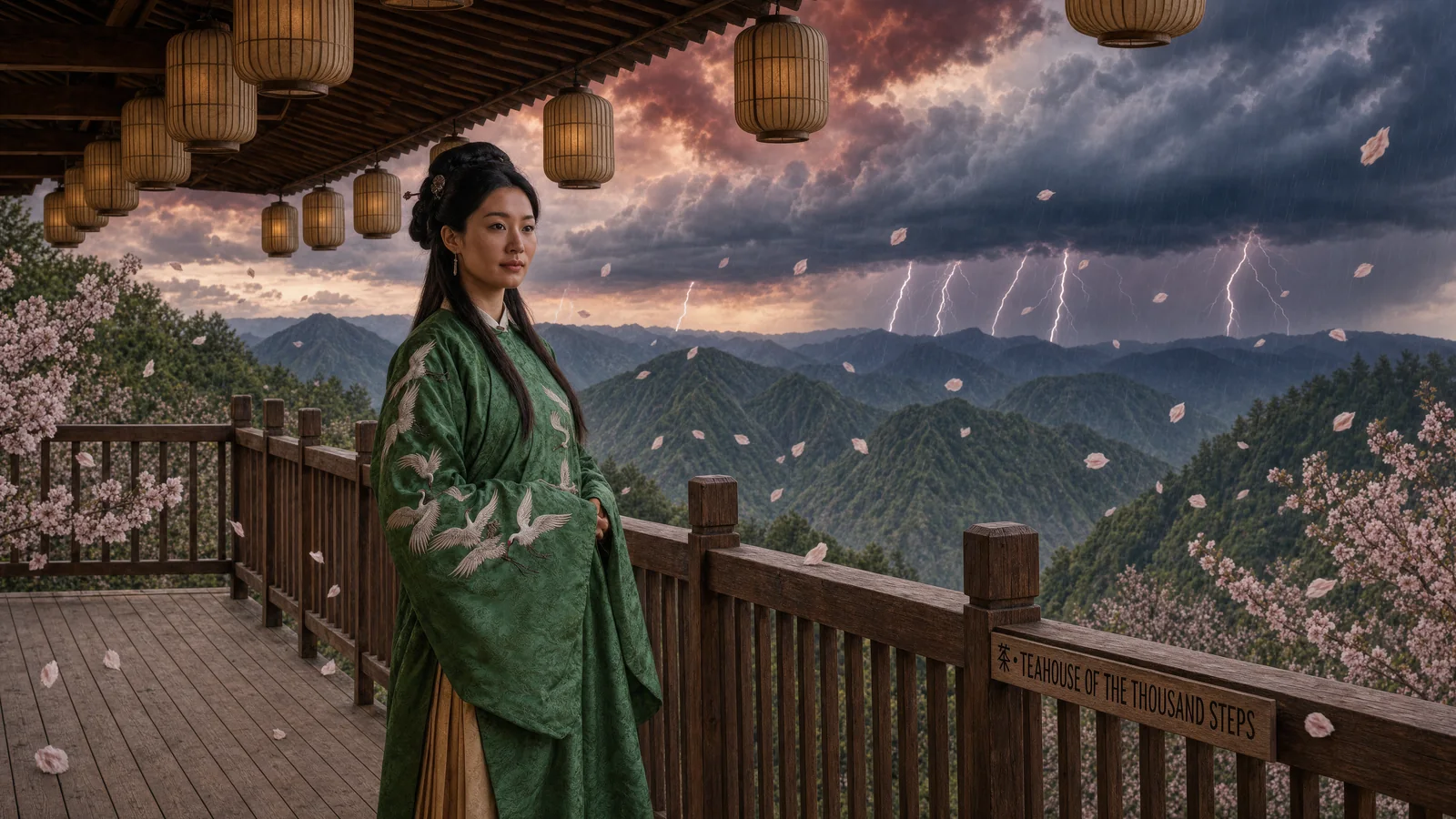
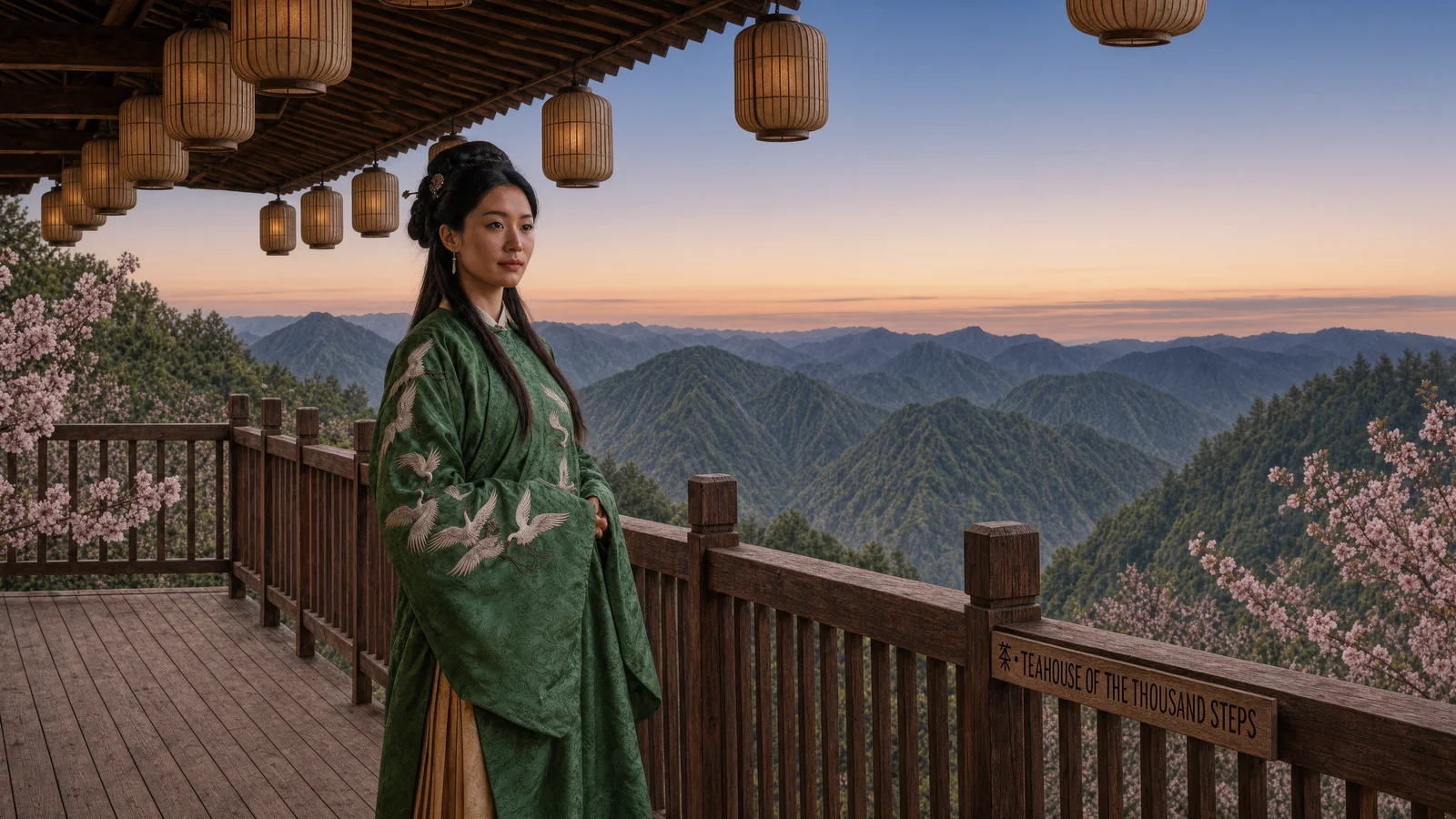
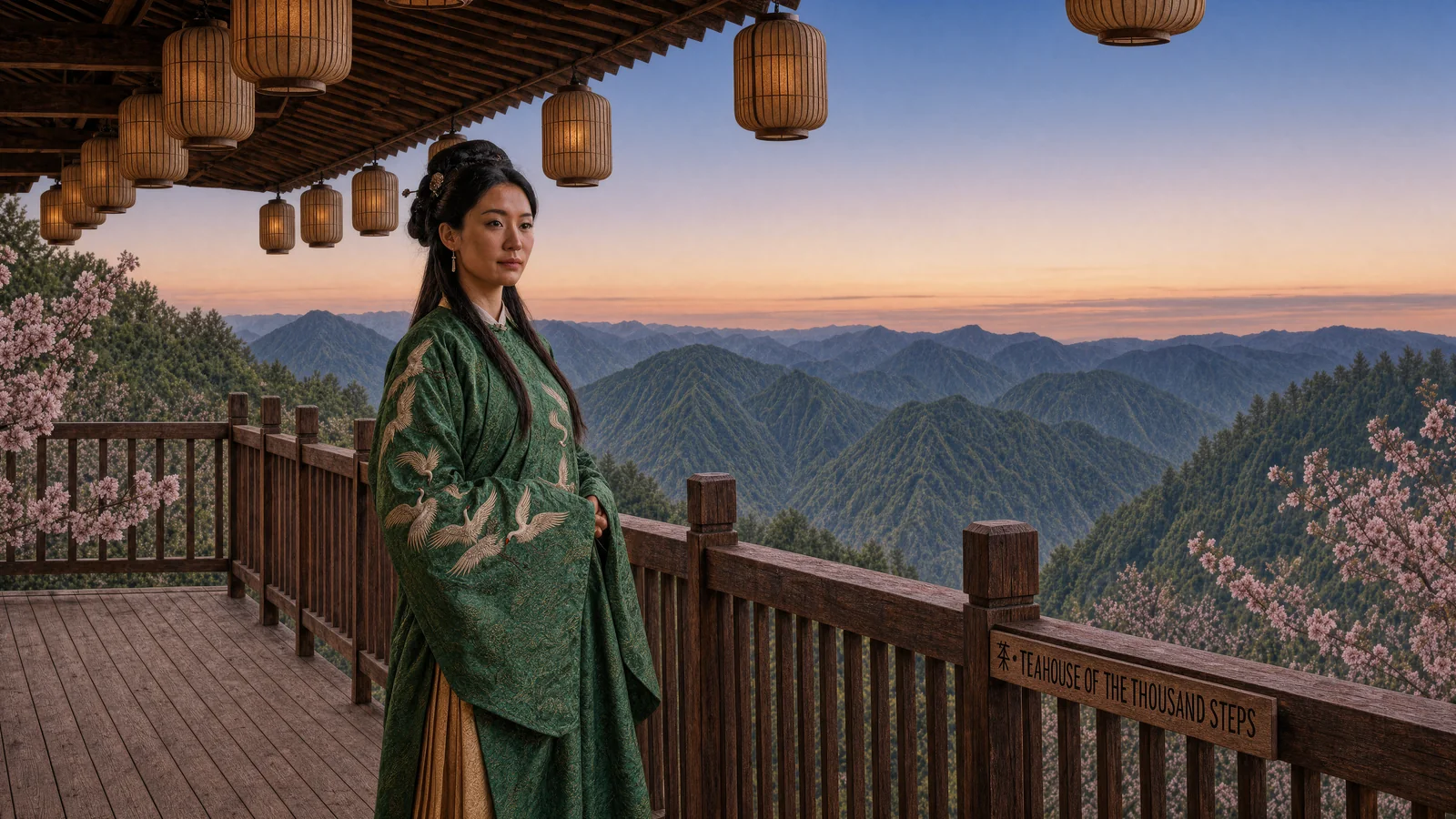
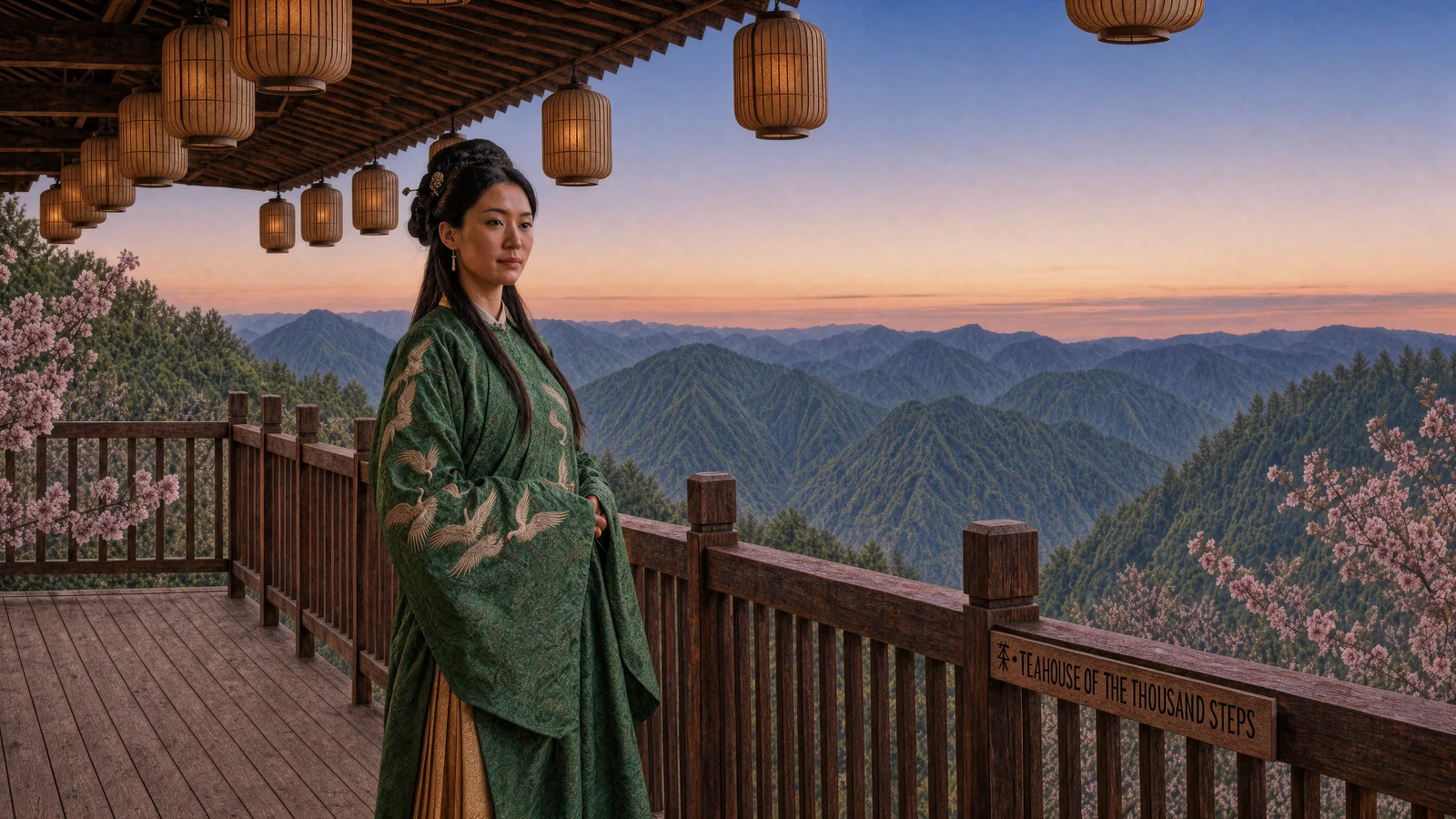
Step 9 is the interesting failure. “Remove the cherry blossoms and the storm” removed the storm completely and removed every petal from the air, then left two blossoming trees standing at the edges of the frame. The model took the narrower reading of “blossoms” and the narrower reading was defensible. The lesson is a prompting one: name the object you want gone, not the material it is made of.
Steps 10 through 12 are not failures of execution. They are the model telling you what it is. “Change the lighting back to golden hour” produced a warmer sky but not the original low sun, because the original low sun is not in the image it was given. “Restore her emerald silk robe and gold crane embroidery to full original detail” tinted the cranes toward gold, since gold cranes are in the prompt, and left the brocade, since the prompt said nothing about weave. The drift metric counts luminance, so the gold tint registers low, but at 100% the fabric is plainly the same brocade. And “return the scene to exactly how it was at the start” moved 0.3% of the pixels, which is the noise floor.
That last number is worth sitting with, because it could have gone the other way. A model with no memory and a mandate to always do something would have invented a new scene. Krea 3 did close to nothing. It read the request, found nothing in its context to satisfy it, and returned the frame nearly untouched. That is the conservative failure, and it is the right one to have. It is also unambiguous: the original is not in the conversation. It is not anywhere.
The sign
One thing never drifted. The sign on the railing reads “茶 · TEAHOUSE OF THE THOUSAND STEPS”, and it reads that way in all thirteen frames. Correct letters in blue hour, under snow (the snow sits along its top edge), through the woodblock print where the lettering was redrawn in ink, through the photoreal restore where the plank it is carved on changed grain, and in the final frame, where the word spacing has shifted slightly and nothing else has. The Chinese character held too.

This is a bigger deal than it looks. Rendered text has been the tell for AI images for three years, and chained edits are where text usually falls apart, because every pass is a chance to re-hallucinate it. Krea 3 treats text as a locked object. If your work has a logo, a label, or a title card in it, that is the capability to care about, and it is the capability that passed cleanly.
What to do with this
Keep your originals and branch from them. The model edits the image in front of it. There is no undo and no “go back to step 3” except on your own disk. If you want the snow version and the spring version, make both from the original, not one from the other.
Chain additive edits freely. Weather, lighting, time of day, objects added to a scene: these stack cleanly and each one lands in one try. Six in a row cost almost nothing in fidelity to the subject.
Treat a style change as a one-way door. Going to ukiyo-e and back cost the face, the fabric and the lanterns. If you need a stylised version and a photoreal version of the same shot, make the stylised one last, from a copy, and never ask for the trip back.
Watch for scene semantics in small words. “It is spring” replaced the whole background. The model does not distinguish between a decorative edit and a change of location, because to the model they are the same operation. Prompts that name a season, a place or a mood can rewrite things you did not mention.
Name objects, not materials. “Remove the cherry blossoms” removed the petals. “Remove the cherry trees” would have removed the trees.
Trust the text. Signage survived everything. That is rare and it is the result to build on.
Caveats
This is one image and one conversation, n=1 by design. The point was to record one honest chain end to end and keep every output, and that is what the video is. A second base image would give different drift numbers and almost certainly the same shape: a plateau through additive edits, a spike at the style change, and a floor the return cannot get below. The drift metric is luminance only, so colour-only edits (the gold tint at step 11) read lower than they look. Steps 10 and 11 were sent together, which is why the table has twelve images for thirteen prompts. The base prompt is summarised rather than quoted. And the model is a closed access build, so the version behind these results is whatever Krea was serving on the day.
Reproduce it
Generate a base frame, then paste these in order, one per turn, keeping the first result each time:
Change the time to blue hour: the lanterns are glowing and the first stars are appearing.
Make it deep night with a huge full moon rising over the clouds.
Add heavy snowfall, with snow settling on the railing, the eaves and the lanterns.
Replace the snow with cherry blossom petals blowing in the wind. It is spring.
Add a thunderstorm on the far horizon with purple lightning lighting the clouds.
Make the clouds below glow with fiery sunset colours.
Repaint the entire scene as a traditional ukiyo-e woodblock print.
Restore the scene to a photorealistic cinematic film still.
Remove the cherry blossoms and the storm. Clear evening sky.
Change the lighting back to golden hour.
Restore her emerald silk robe and gold crane embroidery to full original detail.
Return the scene to exactly how it was at the start: same lighting, sign, lanterns and pose.
Save every output at full size. The drift score is a few lines of PIL: convert each frame to greyscale at 684×384, take the absolute difference against the original and against the previous frame, and count the share of pixels above 40. The video, the heatmap, the chart and the close-up board come from a single Python script over the same twelve files, ordered by save time, with the crop boxes for the face, the sign and the embroidery fixed in source coordinates so the before and after crops are the same pixels.